Windows PC
The agent runs on the customer’s Windows PC, next to Reckon Accounts Desktop or Reckon Accounts Enterprise.

Keep using Reckon Accounts Desktop for accounting while CreataCRM helps manage your customers, sales, jobs, warehouse, purchasing and business automation.
This Reckon Accounts Desktop integration is development-tested for Reckon Accounts Desktop and Reckon Accounts Enterprise. Reckon stays the company file. CreataCRM is where the team runs customers and operations.
Development-tested. Reckon Hosted and Reckon One are separate integrations. The Desktop Agent is scheduled, not real-time.
 Desktop
Keep Reckon Accounts Desktop for accounting and extend customer, sales, jobs and operations work in CreataCRM. The video shows CreataCRM alongside Reckon. The Desktop connection itself is the Windows agent described on this page.
Import the accounting records your team needs, then create new Reckon documents from the sales and purchasing work done in CreataCRM.
Import Reckon customers and suppliers so CreataCRM users are not keeping a second list.
Prepare the sale in CreataCRM, then create a new Reckon estimate, sales order or invoice.
Import products, service items, inventory items and assembly items from the company file.
Raise the purchase in CreataCRM, then create a new Reckon purchase order or supplier bill.
Schedule and deliver jobs in CreataCRM. Job records are not synchronised to Reckon Desktop.
A Windows agent on the Reckon PC, using the local SDK and an outbound connection every 30 minutes.
Reckon Accounts Desktop remains the accounting system. CreataCRM imports the customers, suppliers, items and invoice history the team needs, then creates a new Reckon document when a sale or purchase is ready.
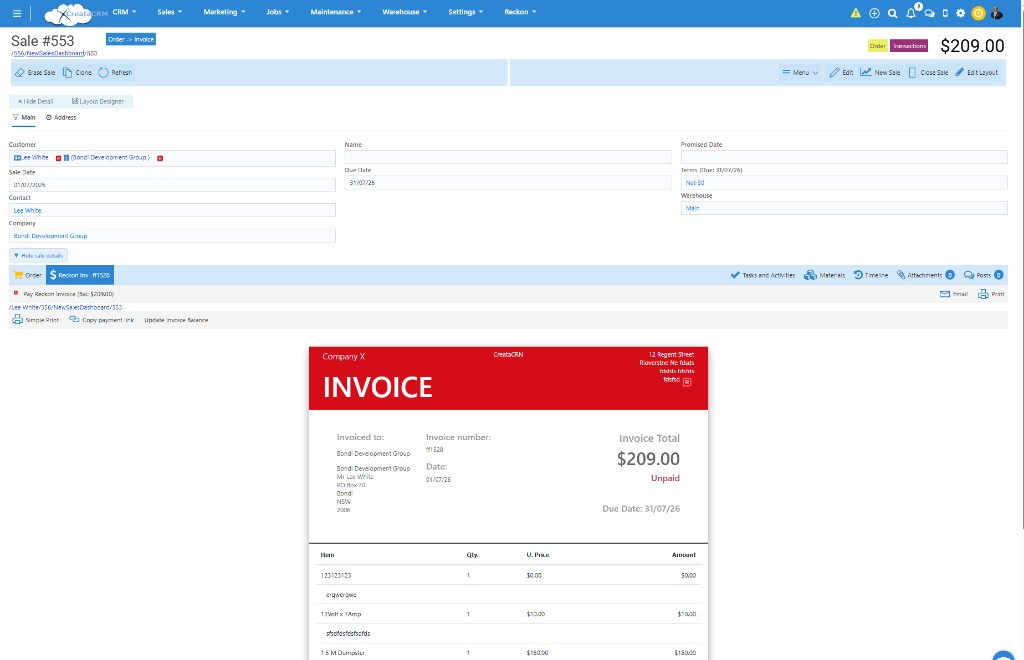
CreataCRM sale with a Reckon invoice preview. Desktop can create the new invoice. Payment actions on this screen are not part of the Desktop integration.
Customer synchronisation and supplier synchronisation bring the Reckon lists into CreataCRM. Invoice and estimate history can be imported with them, so a salesperson can see what has already been billed without typing it in again.
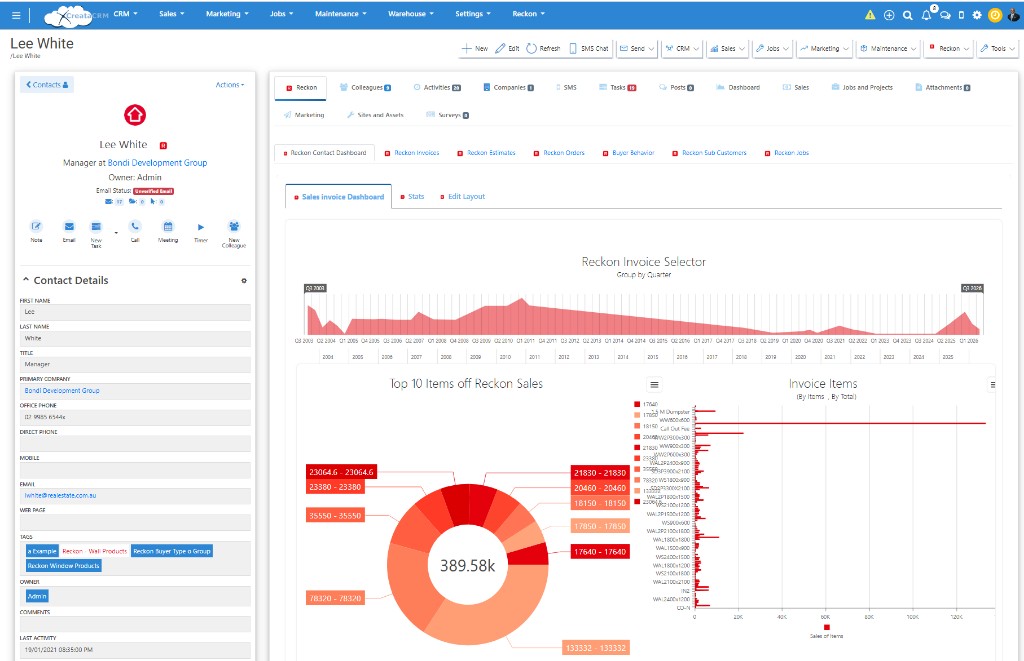
CreataCRM contact screen. Desktop imports the customer, invoices and estimates. Job sync, buyer-behaviour sync and live statements are not part of this integration.
Leads, opportunities, quotes and sales orders stay in CreataCRM while the deal is moving. Create invoices from quotes in CreataCRM, then send one new document to Reckon Desktop.
Each action creates one new Reckon document. These actions do not edit Reckon records that already exist, and they do not create payments or credit notes.
Product and service items, inventory items and assembly items are imported so quotes, orders and warehouse work in CreataCRM can use the item list from the company file. Warehouse picking, receiving and assembly builds stay in CreataCRM.
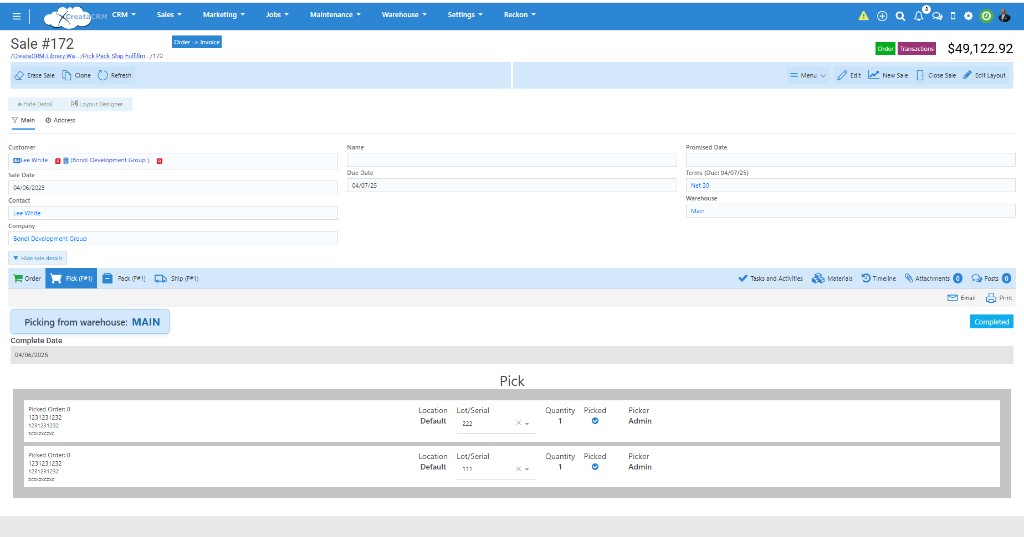
Warehouse pick in CreataCRM. Inventory and assembly item records can be imported from Reckon Desktop. This pick screen is not a Desktop stock synchronisation.
Supplier orders are managed in CreataCRM against suppliers imported from Reckon. When the order or the bill is ready, CreataCRM creates the new document in Reckon Desktop.
The purchase is prepared in CreataCRM. Reckon Desktop receives a new purchase order or a new supplier bill.
Schedule work, assign staff and track job progress in CreataCRM, against customers imported from Reckon Desktop. When the work is ready to bill, create a new Reckon invoice. Job records themselves are a CreataCRM capability.
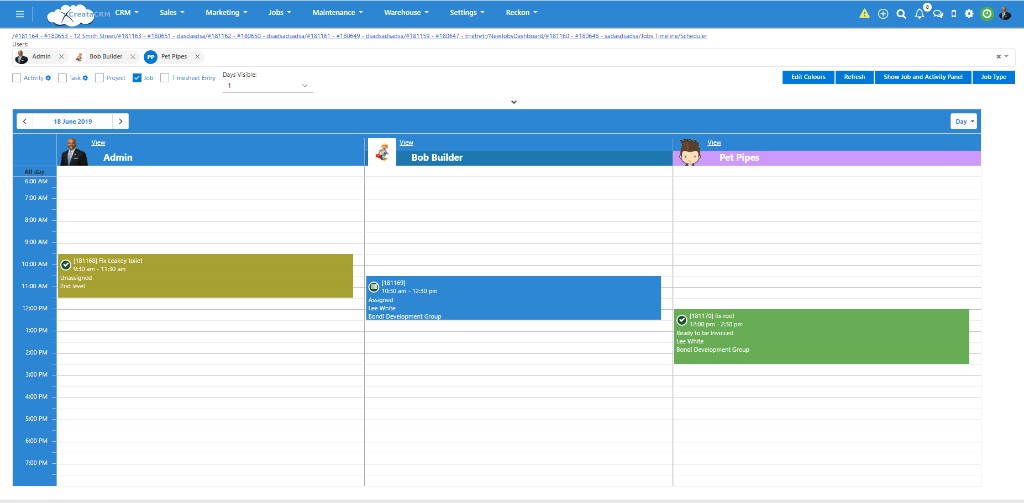
Jobs schedule in CreataCRM. This is CreataCRM job management, not a Reckon Desktop job synchronisation.
Reckon Accounts Desktop and Reckon Accounts Enterprise keep the company file on a Windows PC. The CreataCRM Desktop Agent runs on that PC.
The agent runs on the customer’s Windows PC, next to Reckon Accounts Desktop or Reckon Accounts Enterprise.
The agent communicates with Reckon Accounts Desktop using the local Reckon SDK.
The agent connects to CreataCRM with an outbound HTTPS connection. Inbound firewall ports are not required.
Synchronisation is designed to run automatically every 30 minutes through Windows Task Scheduler. It is not real-time.
Each run includes controlled retries, session tracking and recovery mechanisms.
This agent is only for the desktop company file. Reckon Hosted and Reckon One use their own integrations.
These are the development-tested imports and create actions. Other Reckon Desktop accounting features are outside this integration.
Imported into CreataCRM. A new Reckon customer can also be created from CreataCRM.
Products, service items, inventory items and assembly items are imported. Assembly builds are not posted back.
Imported for history. CreataCRM can create a new Reckon estimate, sales order or invoice.
CreataCRM can create a new Reckon purchase order or supplier bill.
Chart of accounts, employees, sales representatives, classes and company information are imported. Timesheets are not included.
Jobs, warehouse, marketing, automation, mobile and CreataAI stay in CreataCRM. They are not a Reckon Desktop synchronisation.
Development-tested for Reckon Accounts Desktop and Reckon Accounts Enterprise. The listed actions import records into CreataCRM and create new Reckon customers and transactions. They do not update existing Reckon records, create payments or credit notes, synchronise timesheets, synchronise jobs, or send assembly stock back to Reckon. Synchronisation is scheduled, not real-time.
The team works in CreataCRM. Reckon Desktop receives the new sales and purchasing documents, and supplies the imported customers, items and invoice history.
CreataAI, workflow automation, mobile and reporting sit on the CreataCRM customer. They are CreataCRM capabilities beside the Desktop connection, not extra Reckon synchronisation. Mail, calendar and Microsoft Teams can also connect to that customer record.
Book a demonstration of the development-tested Desktop connection: imports into CreataCRM, new Reckon sales and purchasing documents, and the Desktop Agent on your Windows PC.